Academy
MCP Connection
AI clients can reason over a request, but they should not receive raw Acumatica credentials, unrestricted ERP URLs, or broad write access.
AI clients can reason over a request, but they should not receive raw Acumatica credentials, unrestricted ERP URLs, or broad write access. MCP gives the AI client a tool interface, and Acumatica MCP Tools controls how those tools reach Acumatica.
Business Problem
Acumatica teams need a control layer that lets an agent inspect approved data, understand available schemas, and call reviewed operations while Acumatica remains the system of record.
Without that layer, teams are left choosing between disconnected chat and unsafe direct access. The MCP endpoint is the narrow middle path: useful enough for real workflows, bounded enough for admin review.
Connection Flow
- The user asks an AI client a normal operating question, such as which open orders need attention today.
- The AI client connects to the hosted MCP endpoint instead of connecting directly to Acumatica.
- The user authorizes access through OAuth.
- The MCP server exposes tool categories for contract REST APIs, Entity OData v4 reads, and Generic Inquiry OData reads.
- The agent starts with schema and read tools to understand customers, items, orders, shipments, inquiries, or other approved data sources.
- The server validates metadata, applies limits, and builds Acumatica paths server-side.
- Reads return cited Acumatica context.
- Writes, deletes, attachments, and workflow actions stay denied unless the admin has explicitly allowlisted the path.
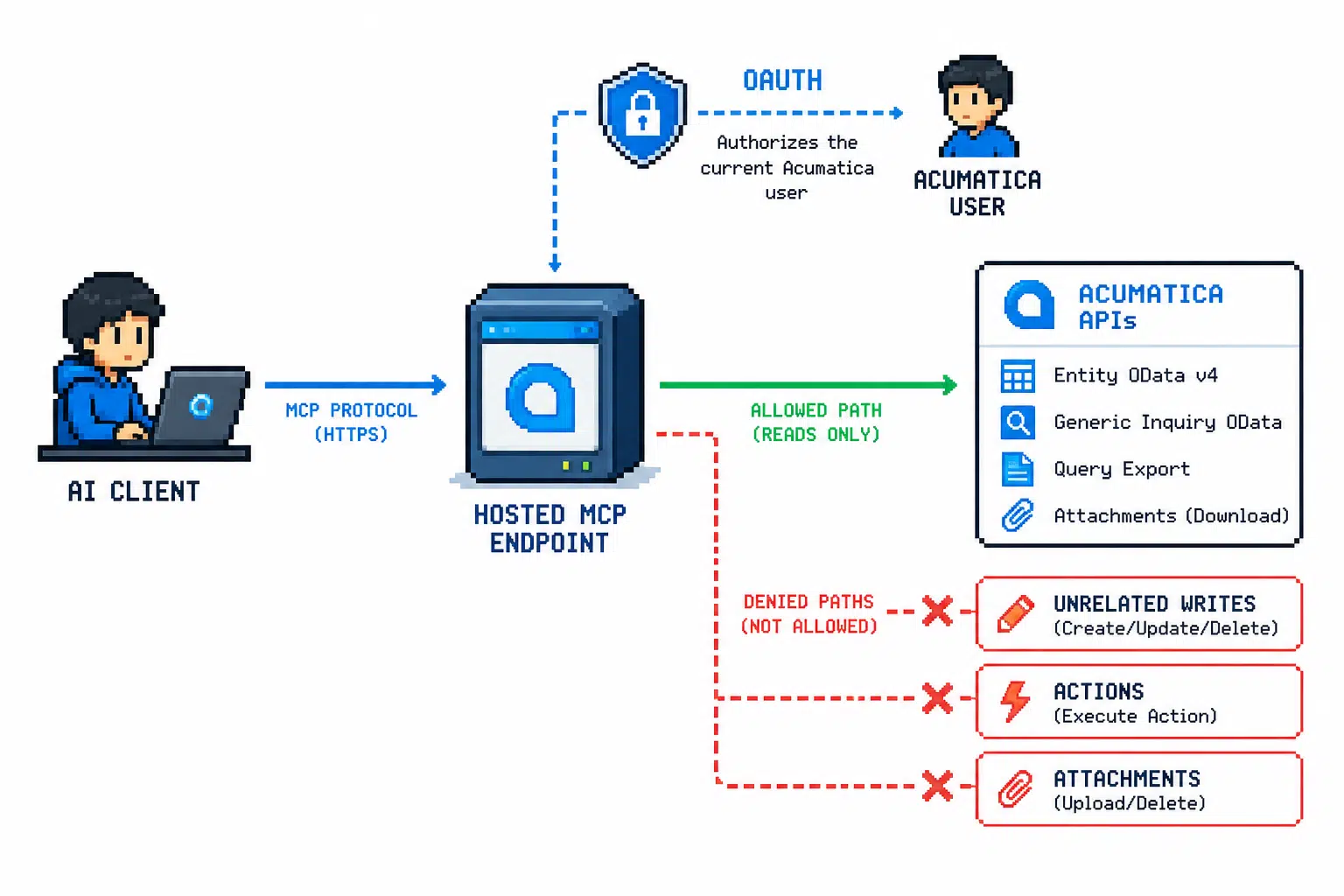
Tool Families
Contract REST API tools handle schema inspection, record reads, and allowlisted creates, updates, deletes, attachments, or actions. They are the right fit when the workflow needs record-level work such as a reviewed sales order, CRM lead, task, attachment, or shipment action.
Entity OData v4 tools are read-only. Use them when the workflow needs approved entity-style data exposed by the tenant.
Generic Inquiry OData tools are also read-only. They are useful when business users already rely on approved inquiry views for fulfillment exceptions, executive summaries, CRM hygiene, or document status.
Query export support can return larger query results as short-lived artifacts instead of inline JSON. Keep public download URLs disabled unless a specific machine-download flow requires them.
Acumatica Data Touched
- Contract API entities such as customers, items, sales orders, shipments, purchase orders, contacts, tasks, or CRM records depending on the workflow.
- Entity OData v4 entity sets where enabled and allowlisted.
- Generic Inquiries exposed through Acumatica OData.
- Attachments or workflow actions only when the specific entity or action path is approved.
Human Approval Point
The user authorizes the AI client through OAuth. The admin reviews MCP scopes, entity allowlists, action allowlists, rate limits, and concurrency limits before any write-enabled workflow is exposed.
For a live business workflow, the user still approves sensitive creates, updates, attachments, actions, or communications before they run.
Guardrails in the Connection
The agent does not call arbitrary Acumatica URLs. The MCP server validates tool arguments, resolves metadata, builds paths server-side, uses the current user’s stored Acumatica OAuth token, and leaves Acumatica permissions as the final authorization layer.
Destructive operations are denied by default. The admin has to expose the tool category, configure the relevant allowlist, and apply limits appropriate to the workflow.
For example, an order desk workflow might start with read tools and later add only these narrow paths:
ACUMATICA_ALLOWED_WRITE_ENTITIES=SalesOrder
ACUMATICA_ALLOWED_ATTACHMENT_ENTITIES=SalesOrder
ACUMATICA_ALLOWED_ACTIONS=SalesOrder/SalesOrderCreateShipment
That configuration still does not bypass the Acumatica user’s own permissions.
What to Verify First
Before enabling writes, verify that OAuth succeeds, the MCP client can reach the endpoint, the server can inspect Contract REST metadata, and the agent can perform a small read-only query against the approved records or Generic Inquiries.
Then test one denied operation. A useful setup should be able to show that the agent can answer a read-only question while still refusing an unrelated write, delete, attachment, or action.
Related Reading
- Developer reference: Safety Model
- Developer reference: Acumatica OAuth Setup
- Developer reference: Configuration Reference
- Developer reference: Tool Guide
- Foundation: ERP Guardrails
Guided Deployment
Bring one Acumatica workflow for guided deployment. We will map the AI client, hosted MCP endpoint, OAuth flow, tool categories, read sources, approval points, and allowlists needed for a controlled first version.