Tool Reference
Tool Guide
This guide explains the major tool families exposed by Acumatica MCP Tools.
This guide explains the major tool families exposed by Acumatica MCP Tools.
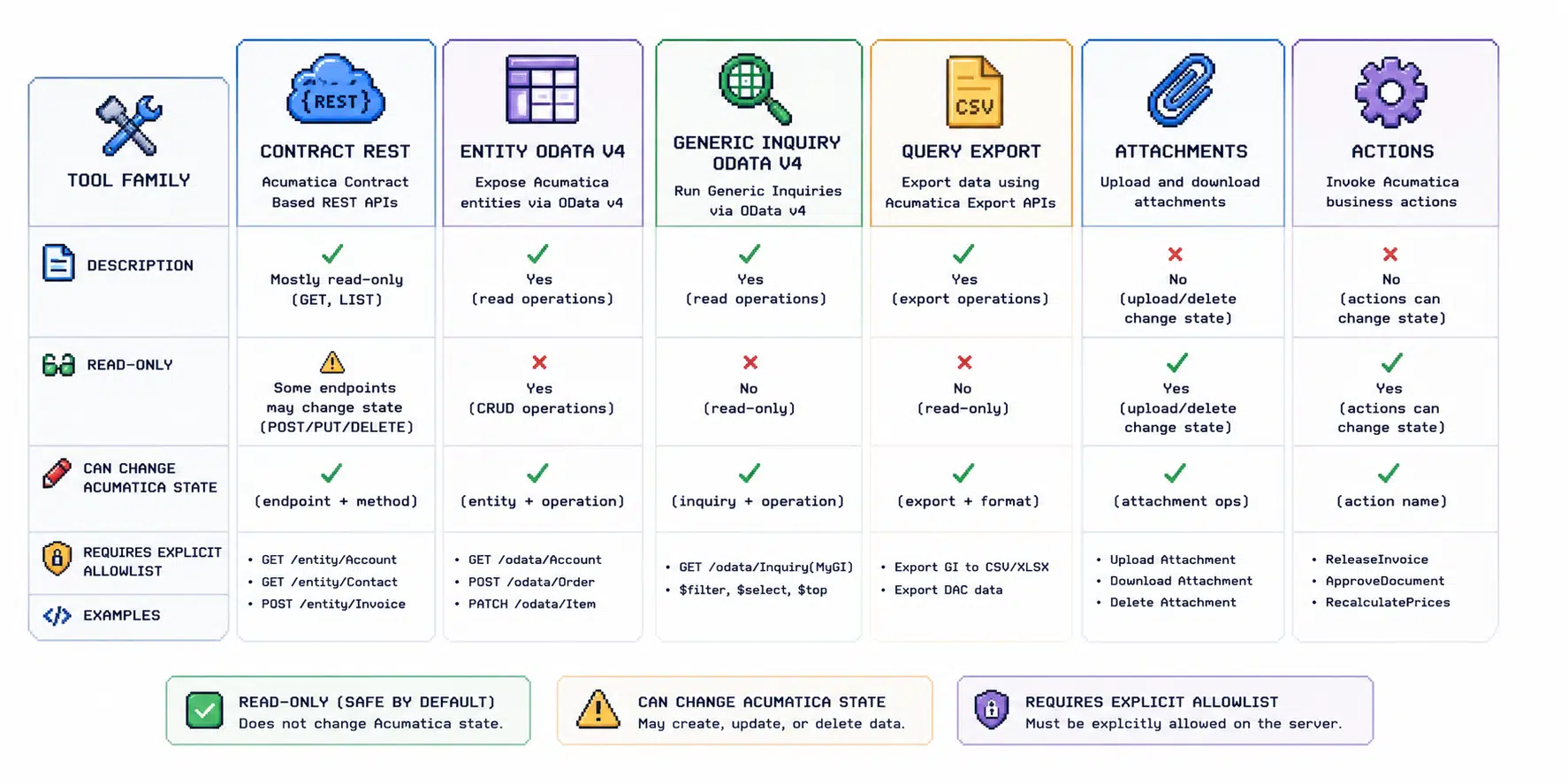
Contract REST API Tools
Use these tools when you need to work with Acumatica Contract REST API entities.
Common uses:
- inspect available entities
- inspect schema
- read records
- create or update allowlisted records
- delete allowlisted records
- attach files to allowlisted records
- invoke allowlisted actions
Safety:
- read tools are broadly useful
- writes are allowlist-controlled
- deletes are denied by default
- attachments are allowlist-controlled
- actions are allowlist-controlled
Example allowlists:
ACUMATICA_ALLOWED_WRITE_ENTITIES=Lead,SalesOrder
ACUMATICA_ALLOWED_ATTACHMENT_ENTITIES=Customer,SalesOrder
ACUMATICA_ALLOWED_ACTIONS=SalesOrder/SalesOrderCreateShipment
Entity OData v4 Read Tools
Entity OData v4 support is read-only.
Use it when you need direct OData v4 reads over Acumatica entity/DAC-style data exposed by the tenant.
Configuration:
ACUMATICA_ENABLE_ENTITY_ODATA_V4_TOOLS=true
ACUMATICA_ENTITY_ODATA_V4_SERVICE_URL=https://example.acumatica.com/odatav4/CompanyName
ACUMATICA_ALLOWED_ENTITY_ODATA_V4_ENTITIES='PX.Objects.SO.*,Customer'
The server:
- loads
$metadata - resolves entity names from metadata
- validates fields and keys
- builds paths server-side
- caps
$top - shapes responses to remove
@odata.*annotations
Generic Inquiry OData Read Tools
Generic Inquiry OData support is read-only.
Use it when business users already have Acumatica Generic Inquiries exposed through OData.
Configuration:
ACUMATICA_ENABLE_GENERIC_INQUIRY_ODATA_TOOLS=true
ACUMATICA_GENERIC_INQUIRY_ODATA_SERVICE_URL=https://example.acumatica.com/odata
ACUMATICA_ALLOWED_GENERIC_INQUIRY_ODATA_INQUIRIES='BILeadConversion,SO-BI-*'
The server:
- loads GI OData metadata
- validates selected columns and order fields
- supports filter, top, and skip
- appends
$format=json - supports parameterized inquiries through exposed function imports
Query Export Tools
Large query results can be returned as short-lived artifacts instead of inline JSON.
Output modes:
inlinedownloadauto
Download mode stores the raw JSON response in Postgres and returns MCP-native artifact metadata.
Public download URLs are disabled by default:
ACUMATICA_QUERY_EXPORT_PUBLIC_DOWNLOAD_URLS_ENABLED=false
Enable public URLs only when a caller needs a one-time machine-download URL outside the authenticated MCP channel.
Attachments
Attachment tools should be enabled narrowly.
Example:
ACUMATICA_ALLOWED_ATTACHMENT_ENTITIES=Customer,SalesOrder
Good attachment workflows:
- attach customer PO to sales order
- attach BOL to shipment
- attach invoice or packing list to purchase record
- attach claim packet to customer/vendor record
Actions
Actions can trigger workflow effects inside Acumatica, so they should be reviewed carefully.
Example:
ACUMATICA_ALLOWED_ACTIONS=SalesOrder/SalesOrderCreateShipment
Prefer action-specific allowlists over broad action entity allowlists.
Recommended First Tools
For beta or first implementation:
- Contract API schema/search/read.
- Generic Inquiry OData reads.
- Entity OData v4 reads.
- One narrow write entity in sandbox.
- One attachment workflow.
- One action workflow only after review.