Developer Setup
Acumatica OAuth Setup
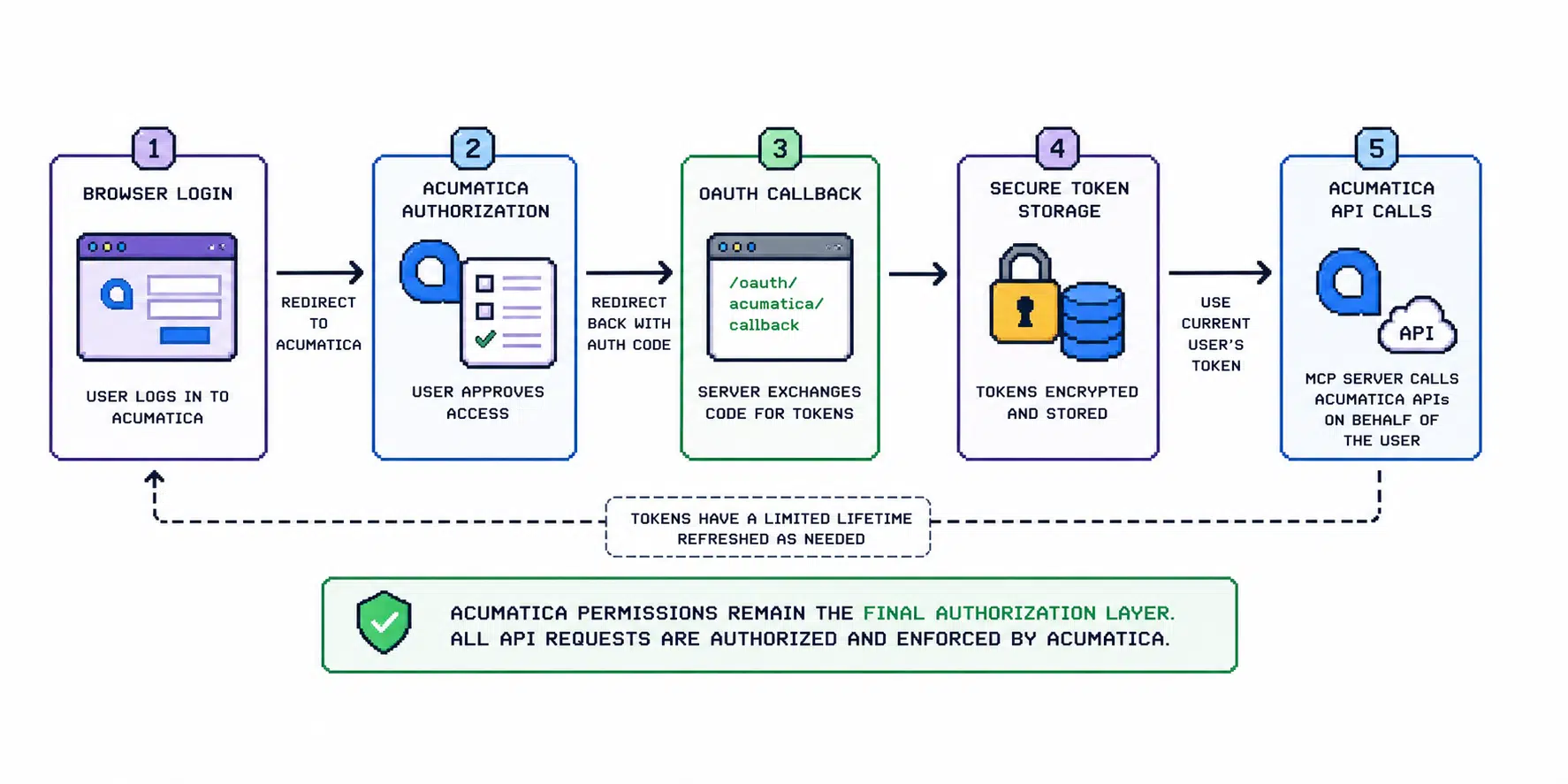
Acumatica MCP Tools uses Acumatica OAuth so live calls are made with the current user's Acumatica authorization.
Acumatica MCP Tools uses Acumatica OAuth so live calls are made with the current user’s Acumatica authorization.
Acumatica permissions remain the final authorization layer. If the user cannot perform an operation in Acumatica, the MCP server should not be treated as a way around that restriction.
Required Values
You need:
- Acumatica site URL
- Contract API base URL
- Swagger URL
- OAuth client ID
- OAuth client secret
- redirect URI
- OAuth scopes
Example configuration:
ACUMATICA_SITE_URL=https://example.acumatica.com
ACUMATICA_BASE_URL=https://example.acumatica.com/entity/Default/25.200.001
ACUMATICA_SWAGGER_URL=https://example.acumatica.com/entity/Default/25.200.001/swagger.json
ACUMATICA_OAUTH_CLIENT_ID=your-client-id
ACUMATICA_OAUTH_CLIENT_SECRET=your-client-secret
ACUMATICA_OAUTH_REDIRECT_URI=http://localhost:5240/oauth/acumatica/callback
ACUMATICA_OAUTH_SCOPE='api offline_access openid'
Redirect URI
For local development:
http://localhost:5240/oauth/acumatica/callback
For remote or production deployments, use the public HTTPS base URL:
https://your-mcp-host.example.com/oauth/acumatica/callback
The redirect URI configured in Acumatica must exactly match the value used by the MCP server.
Token Storage
For production-like environments, use Postgres-backed token storage:
ACUMATICA_TOKEN_STORE_PROVIDER=Postgres
ACUMATICA_POSTGRES_CONNECTION_STRING='Host=postgres;Port=5432;Database=acumatica_mcp;Username=acumatica_mcp;Password=change-me'
ACUMATICA_TOKEN_ENCRYPTION_KEY_BASE64='<32-byte-base64-key>'
ACUMATICA_TOKEN_ENCRYPTION_KEY_ID=prod-2026-05
Generate a key:
openssl rand -base64 32
File token storage is only for local development and must be explicitly enabled:
ACUMATICA_TOKEN_STORE_PROVIDER=File
ACUMATICA_ALLOW_PLAINTEXT_FILE_TOKEN_STORE=true
Common Problems
Redirect Mismatch
Symptoms:
- OAuth authorization fails
- Acumatica reports redirect URI mismatch
Check:
ACUMATICA_OAUTH_REDIRECT_URI- public base URL
- reverse proxy forwarded headers
- exact path
/oauth/acumatica/callback
Missing Offline Access
Symptoms:
- authorization works, but token refresh fails later
Check:
ACUMATICA_OAUTH_SCOPE- whether
offline_accessis included
Wrong Site URL
Symptoms:
- OAuth starts against one Acumatica URL, but API calls target another
Check:
ACUMATICA_SITE_URLACUMATICA_BASE_URL- tenant-specific URL paths
Safety Notes
- Do not send OAuth client secrets through email.
- Do not paste secrets into marketing forms.
- Rotate client secrets if they are exposed.
- Use separate OAuth clients for sandbox and production where possible.