Developer Setup
Docker Deployment
Run Acumatica MCP Tools with Docker Compose and review the operational details for simple server deployments.
Use this page when your team operates the MCP server, token storage, reverse proxy, and deployment process directly. For the first local run, start with Quick Start; this page focuses on the Compose services and deployment concerns.
Services
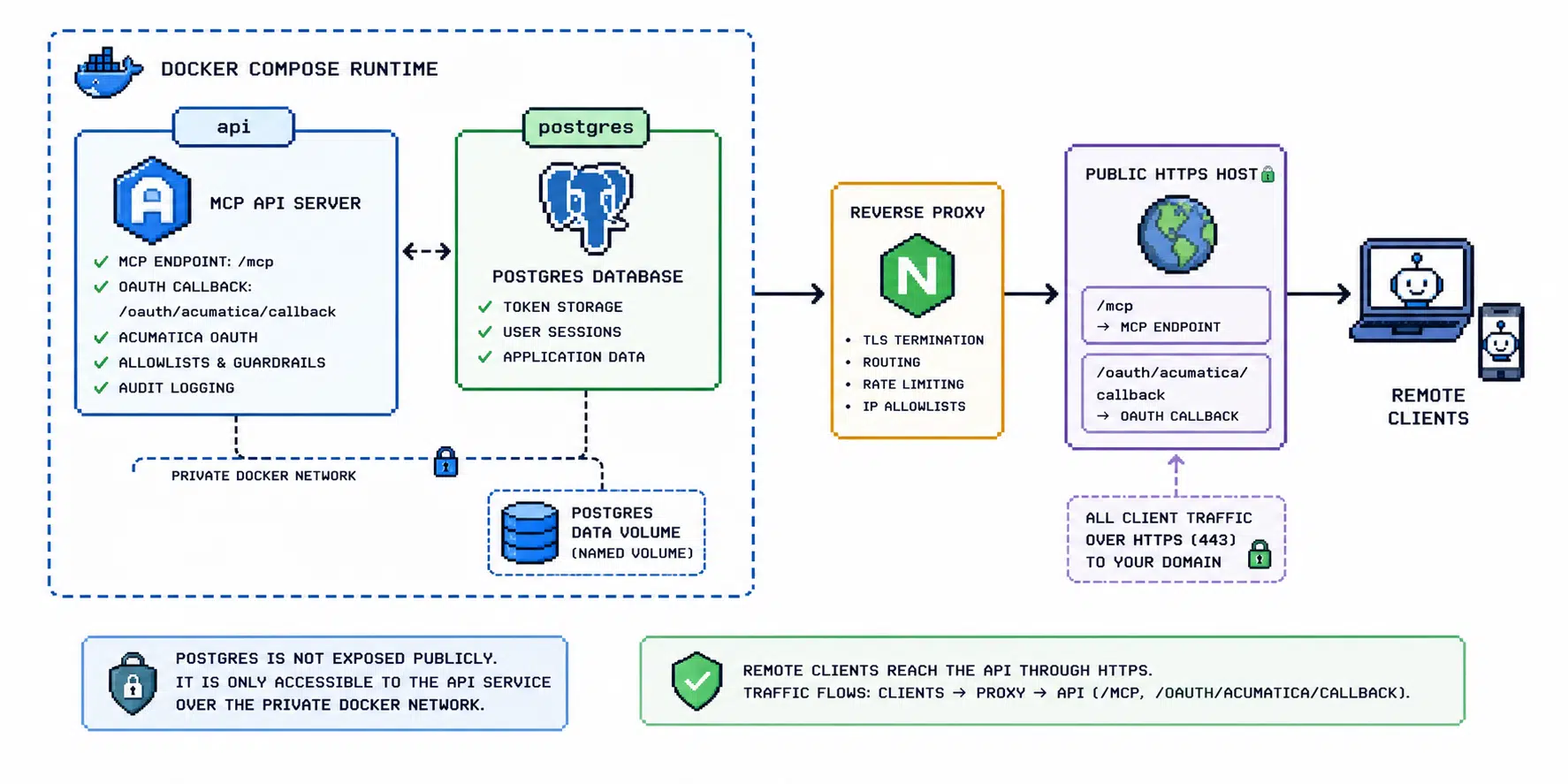
The Compose file starts the ASP.NET Core API and Postgres. The API exposes the MCP endpoint and OAuth helper routes. Postgres stores tokens, OAuth state, audit/cache tables, and related server data.
The default service names are api and postgres.
Required Configuration
Docker Compose reads configuration from a .env file in the repository root. Use the minimal local example in Quick Start or the complete variable groups in the Configuration Reference.
Start
Start the services from the repository root:
docker compose up --build
The default local service URL is:
http://localhost:5240/
OAuth login and MCP traffic use:
http://localhost:5240/oauth/acumatica/login
http://localhost:5240/mcp
Ports
The API binds to 127.0.0.1:5240 by default through Compose.
Override the bind address or port only when the server needs to be reached outside the local machine:
ACUMATICA_API_BIND_ADDRESS=0.0.0.0
ACUMATICA_API_PORT=5240
Expose publicly only behind HTTPS and a reverse proxy.
Postgres
Compose creates a named volume for Postgres data:
acumatica-mcp-postgres-data
The API service receives a Postgres connection string pointing at the postgres container. Do not expose Postgres publicly.
Migrations
The app applies EF migrations automatically only in development when Postgres storage is enabled.
For production-like deployments, use an explicit migration release step or a dedicated migration job. Do not depend on development startup behavior for production operations.
Reverse Proxy
For remote clients, place the API behind HTTPS and make the public URL match the MCP and OAuth configuration. The Acumatica OAuth redirect URI must match the public callback URL exactly.
Check these settings before exposing the service:
- use HTTPS
- set
ACUMATICA_MCP_PUBLIC_BASE_URLto the public URL - set
ACUMATICA_MCP_ALLOWED_ORIGINSto trusted origins - ensure forwarded headers are configured
- ensure the Acumatica OAuth redirect URI matches the public callback URL
Production Checklist
- Use Postgres token storage.
- Use a strong token encryption key.
- Keep destructive allowlists narrow.
- Disable wildcard destructive allowlists outside sandbox QA.
- Review rate and concurrency settings.
- Enable audit log collection.
- Do not expose Postgres publicly.
- Do not run without HTTPS for remote clients.