Developer Setup
Acumatica MCP Tools Developer Docs
Learn how Acumatica MCP Tools exposes controlled Acumatica workflows through an MCP endpoint, with OAuth, allowlists, rate limits, and audit logs.
Acumatica MCP Tools connects MCP-compatible AI clients to Acumatica through controlled tools for Contract REST APIs, Entity OData v4, and Generic Inquiry OData. The goal is specific workflow access, not unrestricted ERP access.
Live calls use the current user’s Acumatica OAuth authorization, so Acumatica permissions remain in force. The MCP server adds its own guardrails: client scopes, server-side allowlists, rate limits, metadata validation, and audit logs.
Use these docs to run Acumatica MCP Tools in your own environment. Start with Self-Hosted Setup, then use Quick Start, OAuth setup, and the safety model for implementation details.
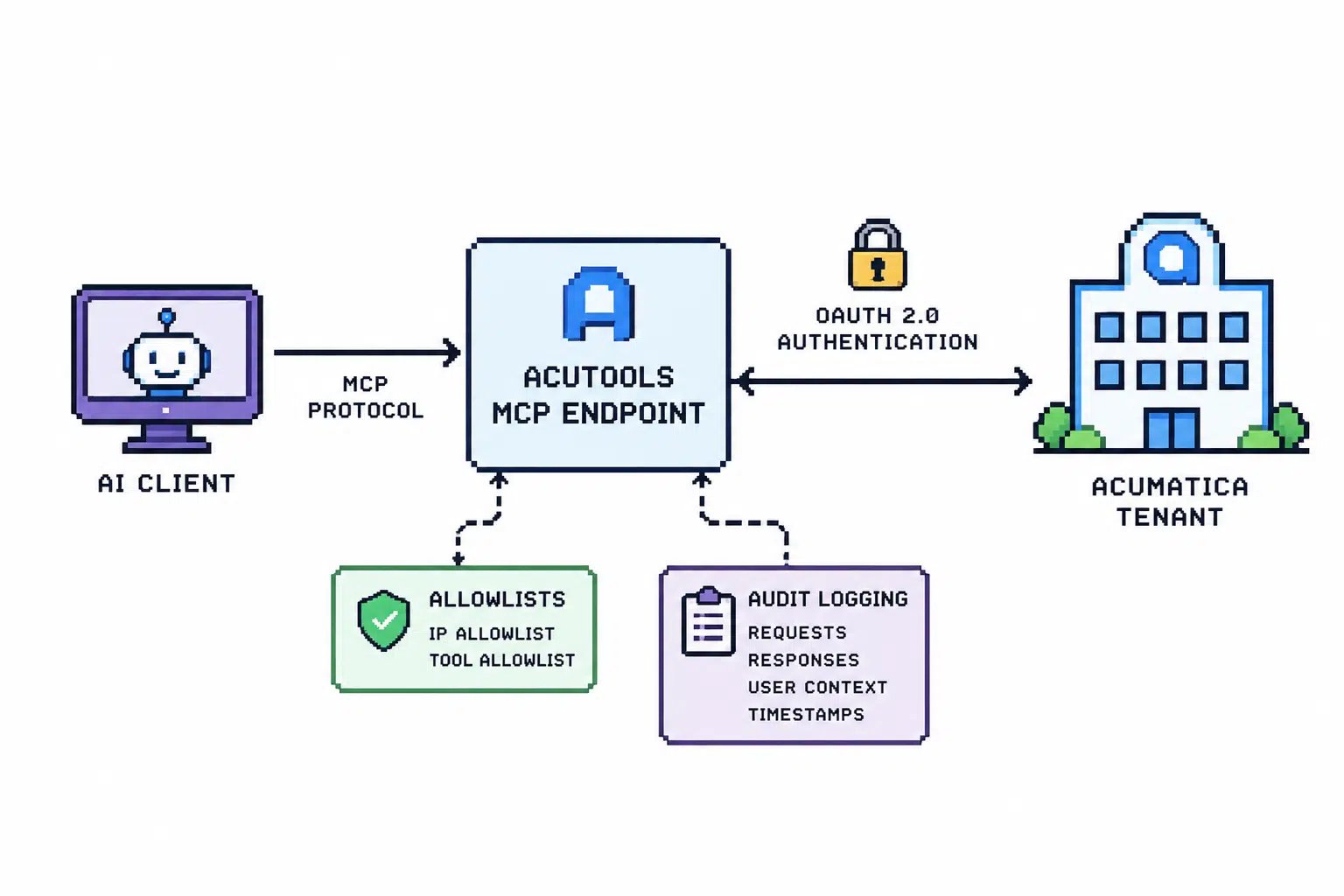
How The Server Fits
The MCP endpoint is the boundary between an AI client and Acumatica. The client calls tools exposed by the server; the server resolves metadata, builds allowed Acumatica paths, applies configuration checks, and then calls Acumatica with the user’s OAuth-backed authorization.
The main tool families are covered in the Tool Guide. Contract REST tools handle entity schema, reads, reviewed writes, attachments, and allowlisted actions. OData tools support read-only query access through Entity OData v4 and Generic Inquiry OData.
Tool calls can be audited with sanitized operation context such as method, path, entity, status, duration, user, and failure state. Secrets, OAuth tokens, authorization headers, cookies, and raw payload values should not be recorded.
What You Can Build
Acumatica MCP Tools is best suited to bounded operational workflows where an agent needs reliable Acumatica context and state-changing steps can be reviewed or denied by configuration.
Typical early workflows include order desk assistance, inventory and fulfillment lookups, CRM record preparation, document reconciliation, and executive operations reporting.
Read-heavy workflows can answer questions about customers, items, sales orders, purchase orders, shipments, opportunities, and other records the user is allowed to access. Write-enabled workflows should start narrower: one sandbox workflow, one explicit allowlist, and audit review before expansion.
Deployment Paths
These pages focus on self-hosted deployment.
The project can run locally or in your own infrastructure with Docker Compose and Postgres. Start with Self-Hosted Setup, then use Quick Start and Docker Deployment for the local commands and service details.
Core Concepts
The server exposes tools at /mcp by default. MCP OAuth scopes determine which tool categories a client token can call. Acumatica OAuth determines which live tenant operations the current user can perform.
Allowlists narrow risk. Writes, deletes, attachments, actions, Entity OData entities, and Generic Inquiry entities can each be limited separately.
Audit logs show what happened, which tool was called, which entity or operation was involved, and whether the request succeeded or failed.
Recommended Rollout
Start read-only. Validate authentication, schema inspection, and the records or inquiry data needed for the first workflow.
Then choose one sandbox workflow, configure the smallest useful allowlist, test an approved path and a denied path, and review audit logs before expanding.