Tool Reference
Safety Model
Acumatica MCP Tools is designed to give AI clients controlled access to Acumatica workflows.
Acumatica MCP Tools is designed to give AI clients controlled access to Acumatica workflows.
The important principle is:
AI agents should not receive unrestricted ERP access.
The server combines MCP authorization, Acumatica OAuth, Acumatica permissions, server-side allowlists, rate limits, concurrency limits, and audit logs.
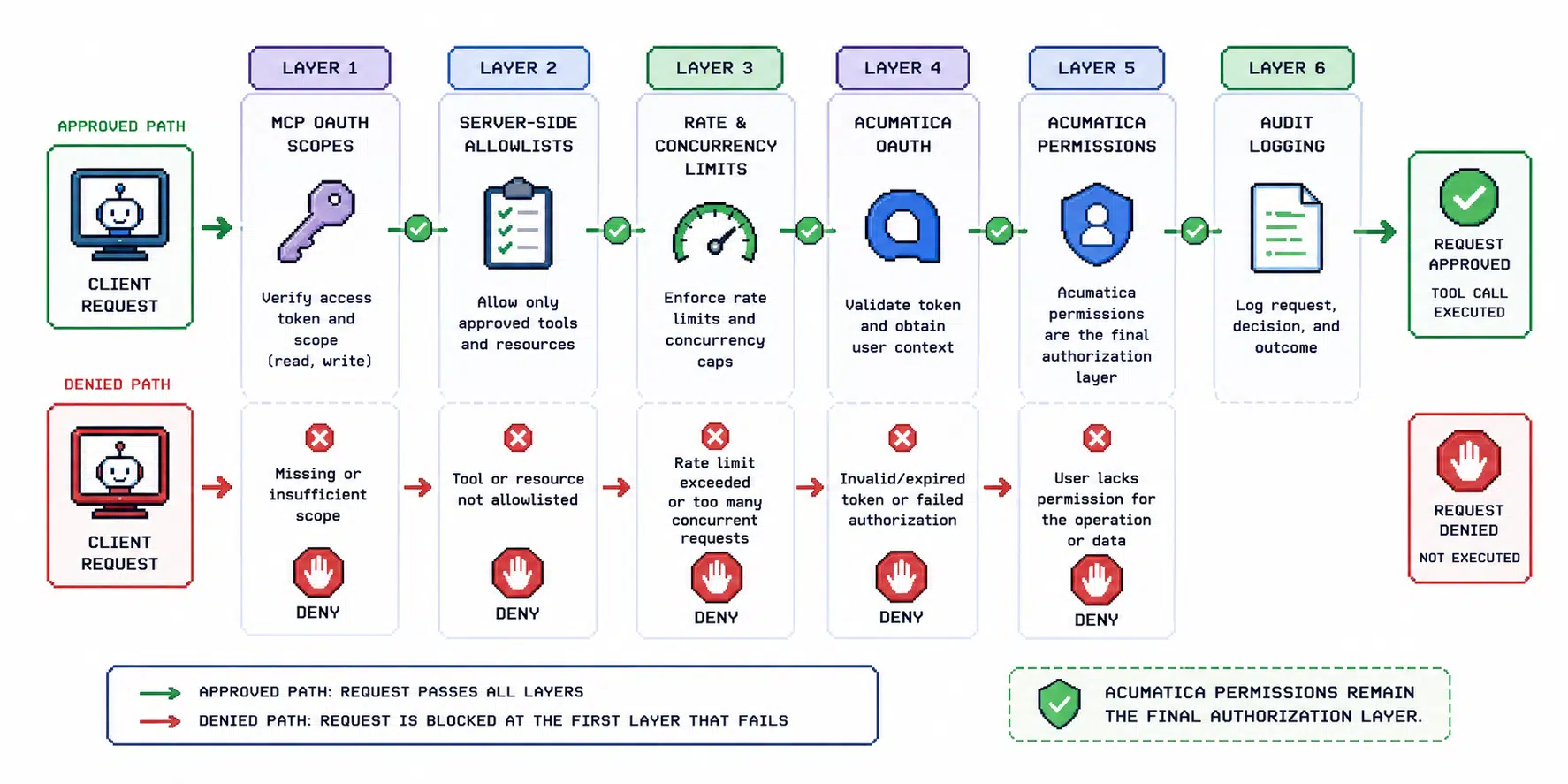
Layers Of Control
MCP OAuth Scopes
MCP OAuth scopes decide which tool categories a client token can call.
Examples:
- Contract API read tools
- Contract API write tools
- Entity OData v4 read tools
- Generic Inquiry OData read tools
- query export tools
Acumatica OAuth
Live Acumatica calls use the current user’s stored Acumatica OAuth token.
This means the user’s Acumatica identity and permissions remain part of the authorization chain.
Acumatica Permissions
Acumatica remains the final authorization layer.
If a user lacks permission in Acumatica, enabling a tool in MCP should not be treated as permission to bypass Acumatica security.
Entity And Action Allowlists
Writes, deletes, attachments, and actions are denied by default until configured.
Example:
ACUMATICA_ALLOWED_WRITE_ENTITIES=Lead,SalesOrder
ACUMATICA_ALLOWED_ATTACHMENT_ENTITIES=Customer,SalesOrder
ACUMATICA_ALLOWED_ACTIONS=SalesOrder/SalesOrderCreateShipment
Wildcard allowlists are supported, but should only be used in short-lived sandbox QA:
ACUMATICA_ALLOWED_WRITE_ENTITIES='*'
ACUMATICA_ALLOWED_DELETE_ENTITIES='*'
ACUMATICA_ALLOWED_ATTACHMENT_ENTITIES='*'
ACUMATICA_ALLOWED_ACTIONS='*'
Avoid wildcard destructive allowlists in shared, production-like, or customer-connected environments.
OData Allowlists
Entity OData v4 and Generic Inquiry OData can be limited separately:
ACUMATICA_ALLOWED_ENTITY_ODATA_V4_ENTITIES='PX.Objects.SO.*,Customer'
ACUMATICA_ALLOWED_GENERIC_INQUIRY_ODATA_INQUIRIES='BILeadConversion,SO-BI-*'
Rate And Concurrency Limits
Write, delete, action, and attachment tools have separate rate and concurrency controls.
Use conservative limits for customer-connected environments.
Audit Logging
Audit logs record operation context such as:
- operation
- method
- sanitized path
- status
- duration
- user
- entity
- operation kind
- failure status
Audit logs should not include:
- OAuth tokens
- secrets
- authorization headers
- cookies
- raw request payload values
OData query strings can contain sensitive business data, so audit paths can omit or redact query strings.
Recommended Rollout
- Start read-only.
- Validate schema and query tools.
- Enable one workflow in sandbox.
- Add narrow allowlists.
- Show a denied risky operation.
- Review audit logs.
- Expand to one additional workflow only after review.
CRM And Email Safety
For CRM campaign workflows:
- check for duplicate Acumatica leads, contacts, business accounts, customers, and opportunities
- create only reviewed leads
- add source/campaign attribution
- keep outbound emails draft-only unless explicitly approved
- deny or review bulk import and send requests
Good Denied Action Examples
- delete a customer
- update all prices for an item class
- import every Apollo result
- send a campaign email sequence automatically
- invoke an action not on the action allowlist
Denied actions are useful in demos because they show the control layer working.